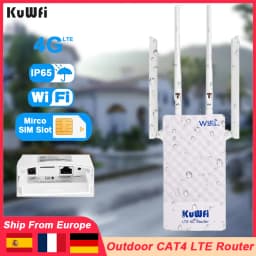
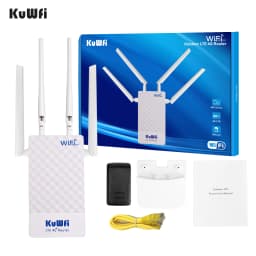
KuWfi Outdoor CAT4 4G Modem 2.4G WiFi Router LTE Router 2x Detachable Antennas with SIM Card Slot POE Port IP65 AP Mode 10 Users
120.95$
58.12$
Quantity:
1
Availability:
Color
Plug Type
Ships From
Card Payments
Crypto Payments
Easy return
Reliable Shipping
Tips:
①The Router not support Digi Spain Sim Card.
②CAT4 4G Download Speed Up to 150Mbps in 4G Mode , 2.4Ghz Wifi Speed Up to 300Mbps in AP Mode.
FAQ:
Q1: Can not recognize SIM card?
A1: Please insert the SIM card before powering up the device, otherwise the SIM card will not be recognised.You can insert SIM card into the router for one minute first,then turn on the power.And then log in web ui page to check the sim card.If still not recognized the SIM card,please install another SIM card from another SIM card operator.
Q2: The device can not connect to the Internet normally?
A2: You need to disable the PIN code of your sim card and manual modify the APN info. in the router. Please log in web ui to fill in correct APN.About APN ,you can call your sim card operator to check.APN setting refer web, www.apn.how
Q3: My router's Internet speed is slow, how can I improve it?
A3: Buyers can log in to the WEB UI page and adjust the network mode of the router, which is recommended to be set to "4G Only". If indoors, buyers are advised to place the router in a position suitable for receiving signals.
Q4: Can this router work in my country?
A4: The router not support Spain Digi SIM Card.Other SIM Card refer.If you are not sure whether it can work in your country,you can consult the seller or research it here before you place the order.Check SIM card web,www.frequencycheck.com.
Q5: Why can't 4G network speeds reach 150Mbps?
A5: Router's 4G chipset top capacity is 150Mbps, and 4G base station's theoretical top speed is 150Mbps too.However the 4G base station provide service to many 4G users at the same time,instead of giving full 150Mbps bandwidth to one user,and 4G signal strength, SIM card limitation and environment would affect the network speed too
Q6: Why the internet speed slower when the SIM card is inserted into the router than in the phone?
A6: Please don't compare the speed of our router to the speed of a cell phone. Our product uses a cheaper 4G chip than a cell phone 4G chip and has a different design scheme, so it is not comparable.
Q7: Wrong or forgotten WIFI password?
A7: Users need to keep the router on, then press the reset button for 10-15 seconds and wait for the router to reboot, the router will restore the initial Wifi password.
Q8: Why doesn't the indicator light come on when the unit is powered on and won't start?
A8: We recommend that users check the voltage in their homes to see if it is normal. Try to change another power outlet or DC 12V power supply and try again.
Q9: If your settings are correct and the device still cannot connect to the network, please consider whether it is caused by the following problems
A9:
1.Account got suspended for too much data usage.
2.Is the SIM card an IoT card?The router not support IoT card.
3.The sim card have limited service ,not work with router or hotspot .
4.Not support roaming service.
5.Some place did not cover the network Frequency band.
Frequency Band:
EU Version
4G LTE FDD:
B1/B3/B7/B8/B20(2100/1800/2600/900/800MHZ)
4G LTE TDD:
B38/B39/B40/B41(2600/1900/2300/2500MHZ)
3G WCDMA:B1/B8(2100/900MHZ)
2G GSM:B3/B8(1800/900MHZ)
Working in all of EU ,Asia ,Africa,Oceania
【About this Item】
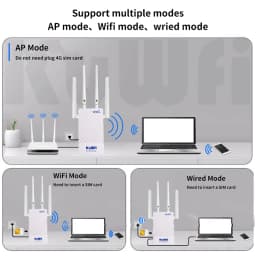
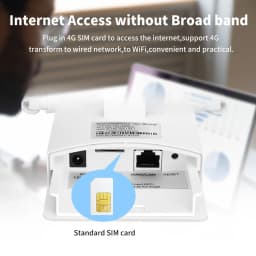
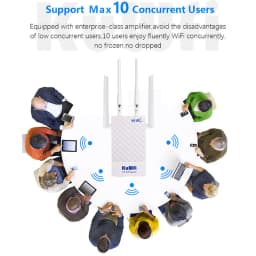
It is a outdoor 4G LTE CPE router designed for WIFI users to get access to internet via UMTS/HSPA/LTE. It is used to supply internet access to indoor &outdoor WiFi coverage and monitor camera project(it can convert 4G to WiFi hotspot)use for indoor or outdoor without broadband place, let you enjoy smooth internet while working from home/working online /telecommuting. can be connected to 10 devices at the same time
【 Main feature Performance 】
KuWFi LTE CAT4 up to 150Mbps IP65 Waterproof and the wireless transmission speed rate is 300mbps. Come with 48V POE adapter PowerSupply work with IP camera and POE switch .
including 1* WAN/LAN port and one sim card slot,Ethernet mode :dynamic/PPPOE/LAN.
Dual high gained external antenna two is 4G antenna and two is WiFi antenna (support remove and change other antenna)
【HOW To Use 】
Please insert SIM card then power on the router, Even if your SIM card is compatible with the product, it is not necessarily plug and play, you may need to disable the PIN code of the SIM card and modify the APN .Enter the router IP address: 192.168.199.1 and Click Network—APN—Enable. Modify APN. You can find the APN of the SIM card from the carrier's official website or mobile phone. Make sure the SIM card is activate, Not support roaming service and Virtual SIM Card and IoT SIM Card
Features:
- HW_VER:POE version
- MTK Chipset:MT6735WM
- Wi-Fi Chipset:MT6625L
- RAM/ROM:4GByte EMMC+512MByte DDR2
- Wi-Fi:IEEE 802.11b/g/n
- 2.4G Wi-Fi Transfer rate:UP to 300Mbps
- Encryption:Wi-Fi Protected Access (WPA/WPA2)2
- Customization:Smart system,high-level;Customization possibility
- LED:LED indicator
4G LTE Category Up to 150 Mbps Download / 50 Mbps Upload
2.4GHz WiFi Speed Up to 300 Mbps on 2.4GHz
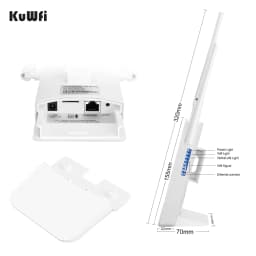
Antennas 2 x 4G LTE Antennas,2 x WiFi Antennas(The two antennas in the middle are detachable, and the two antennas on the outside are not detachable)
SIM Slot Micro SIM (also include with a SIM adapter which could turn Nano SIM to a Micro SIM)
Port
- SIM:3FF SIM(SIM card is NOT including)
- USB:USB TYPE A (5V 1A IN)
- Power:12V 1A IN/48V POE Adapter(We only send 48V POE Adapter)
- RJ45:1* WAN/LAN
Internet
- Wi-Fi:Wi-Fi AP Max 10 users
- SSID:4G-CPE-XXXX(last 4 digits of IMEI)
- WiFi password by default:1234567890
- Gateway: 192.168.199.1
Operating Environment
- Working temperature: -20° to 75°C
- Working height:Current tested max height 3000m (10,000 inches)
Operation system
- PC Users: A PC with Windows XP (SP3), Windows Vista (SP1), Windows 7,or Windows 8
- MAC Users: A Mac with OS X v10.5.7,OS X Lion v10.7.3 or later
- IPAD Uers: An iPhone, iPad, or iPod touch with iOS 5 or later
- Android Uers: An mobile Phone or Tablet PC with Android 2.3 or later
If you still can't recognize the sim card, please try to use the cable connection to check whether the router has a problem
Computer connection: Use a network cable to connect the computer to LAN port of the router; If the indicator light of the LAN port connected to the computer does not light up, please confirm that the network cable is firmly plugged in or replace the network cable. As shown below:
APN Setting:
Customer Reviews
No reviews yet
KuWfi Outdoor CAT4 4G Modem 2.4G WiFi Router LTE Router 2x Detachable Antennas with SIM Card Slot POE Port IP65 AP Mode 10 Users
120.95$
58.12$
Quantity:
1
Availability:
Color
Plug Type
Ships From